
Shopify apps hacked: what happened with Swym, Hulk Product Options and Selleasy, and how to check your store
In October 2026, shoppers at stores using Hulk Product Options, Selleasy and Swym Wishlist Plus were sent to fake payment pages after clicking Checkout. How the attack worked in plain terms, how to check your store, and what to do if you find something.
Syncube team
Gift Card Hero · 2026-10-23
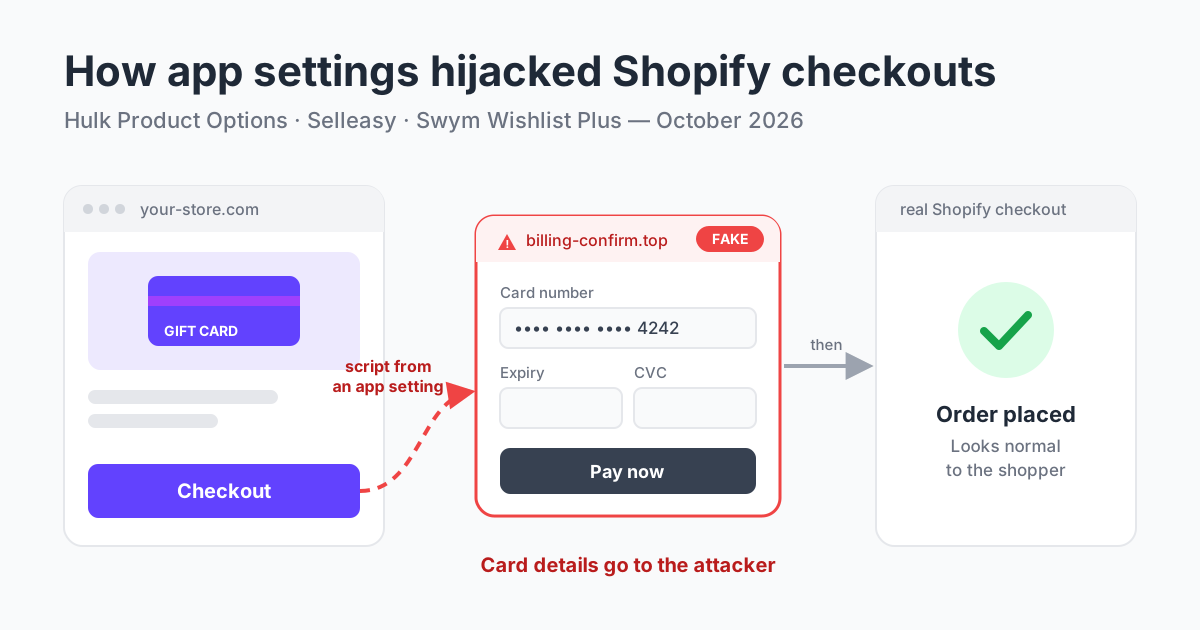
In October 2026, shoppers at an unknown number of Shopify stores clicked Checkout, typed their card details into what looked like a payment page, and then finished the order on the real Shopify checkout. The payment page was fake. The attackers did not break into Shopify. They got their code onto storefronts through three popular apps: Hulk Product Options by HulkApps, Selleasy by Logbase and Swym Wishlist Plus by Swym.
What happened, in plain terms
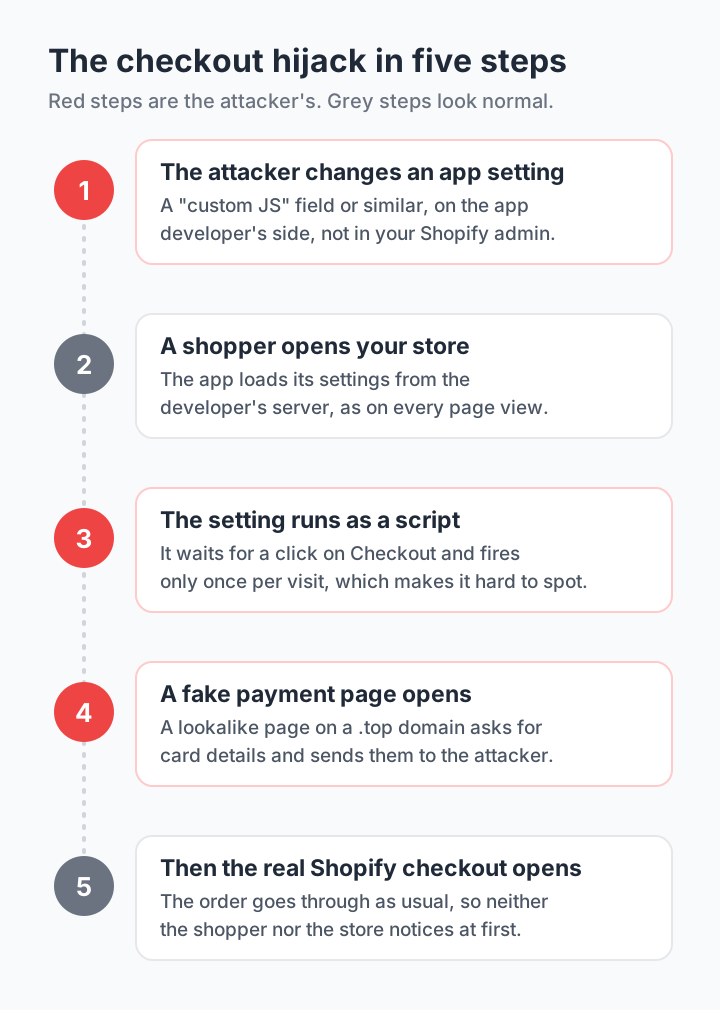
Many apps don't run only the code files they ship. When a page opens, they also fetch their settings from the developer's own server: button text, colours, which products to show, and in some apps a box where the merchant can paste their own JavaScript. Whatever ends up in such a box runs on your storefront.
In all three cases, someone changed those settings. The added script waited for a shopper to click Checkout and sent them to a page on a domain such as billing-confirm.top that imitated a payment form. The card details went to the attacker. Then the shopper was forwarded to the real Shopify checkout, so the order went through and nothing looked wrong. The script fired only once per visit, which made it hard to reproduce.
Timeline: Hulk Product Options, Selleasy and Swym Wishlist Plus
| App | When | How the script got in | What the developer says |
|---|---|---|---|
| Hulk Product Options (HulkApps) | Found on October 10 by developer Roman Zipp. Shopify switched off the app's theme extension the same day | The attack code came back from the app's own API in a custom_js field. HulkApps: "an exploit introduced unauthorized configurations" | Found no other Hulk apps delivering redirects. Hired an outside firm for incident response and a penetration test |
| Selleasy (Logbase) | October 13, 07:47–15:00 UTC | "An unauthorised party gained access to an internal Selleasy tool" and added a script to the Selleasy settings of a number of stores | No evidence so far of a breach of its backend or database. Custom JS setting locked, independent firm doing an audit |
| Swym Wishlist Plus (Swym) | October 14, about 10:06–11:56 UTC, and a second wave later that week | A change to the app's configuration loaded a script on some storefronts. The second wave used the app's own access to add scripts to stores | App paused for all merchants, Shopify access revoked for Wishlist Plus and all other Swym apps |
Sources: Roman Zipp's write-up and his summary of the companies' statements, iTnews, the Selleasy incident page, Swym's incident update and FAQ, and cside's analysis. None of the developers has said how many stores were affected. At the time of writing, Hulk Product Options and Selleasy were not available on the Shopify App Store. Swym Wishlist Plus was listed again, though Swym's FAQ of October 20 said the app stays paused until Swym restores access.
Why app settings are the weak spot
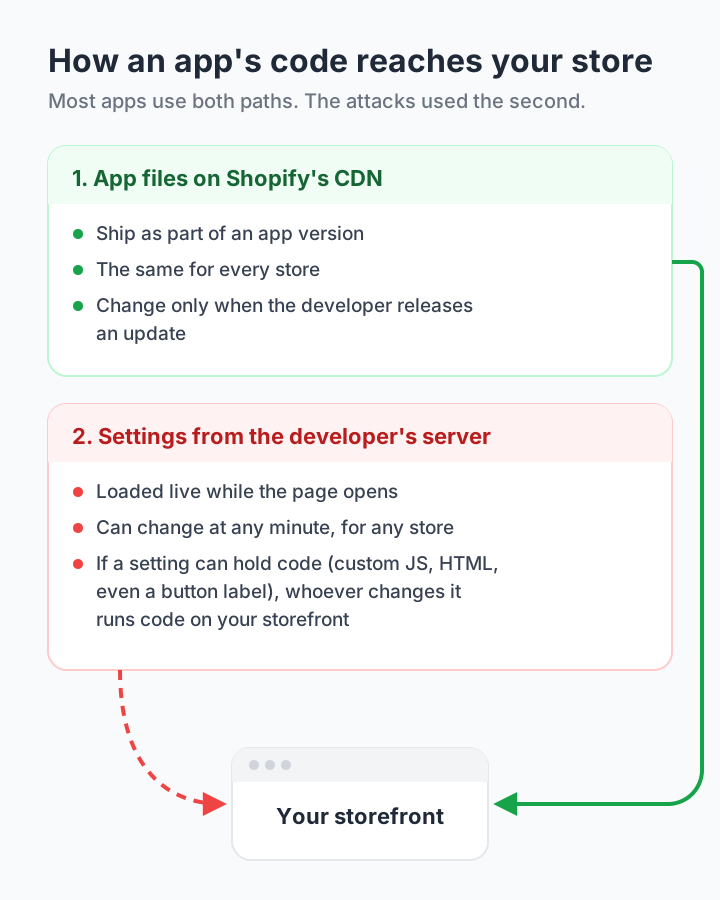
An app reaches your storefront in two ways. Its code files are served from Shopify's CDN as part of an app version: they are the same for every store and change only when the developer ships an update. Its settings come from the developer's server each time a page opens, and they can change at any minute, for any store.
Settings are meant to be data, not code. The trouble starts when a setting can hold code: a custom JavaScript box, raw HTML, or a label that gets pasted into a script without escaping. Then anyone who can change that setting, through a stolen login, an internal tool or the app's own access, can run code on the way to your checkout. Checks on the app's files don't catch it, because the code arrives as data from an address the store already trusts.
How to check your Shopify store
If you used any of these apps in October, or you use any app that lets you add custom code, go through this list. It takes about 15 minutes.
- 1Test checkout in a private browser window, more than once. Add a product and click Checkout from the cart page and from the cart drawer, on a computer and on a phone. Until you pay, the address bar should show your store's domain or myshopify.com, never another site. The script fired once per visit, so one clean test proves little.
- 2Look for __ctf_ keys. On your store, open Chrome DevTools, then Application > Session storage. Keys that start with __ctf_ were left by this script.
- 3Search your theme code (Online Store > Themes > Edit code) for checkout-guard, __ctf_ and .top. Check the theme's version history for edits made by an app rather than by your staff.
- 4Open every app setting that accepts custom JavaScript or HTML and remove anything you didn't add yourself.
- 5Turn off app embeds you don't need (Online Store > Themes > Customize > App embeds), including those of any app named in an incident, until its developer confirms the fix.
- 6Change passwords and turn on two-step authentication for every staff account, and review collaborator access and the apps installed on your store.
What to do if you find something
- Keep evidence first: screenshots that show the address bar and the time, and if you can, a HAR file from DevTools (Network > Export HAR).
- Switch off the app's embed and remove the code you found.
- Tell the app developer, Shopify Support and your payment provider in writing. Your payment provider can watch for fraud on the cards used in that period.
- Ask your payment provider and a lawyer whether you must notify customers. Swym pointed merchants to state breach-notification laws, data protection laws such as GDPR, and their agreement with the payment processor.
- Change passwords and API keys for your store and the services connected to it.
How to choose apps that can't be turned against your checkout
No app is risk-free, but some designs leave far less room for this kind of attack. Before you install an app, or when you review the ones you have, ask:
- Can anyone add custom code through the app? A custom JavaScript box is convenient, and it is exactly what was abused here. Prefer apps that don't need one.
- Where does its storefront code come from? Code served from Shopify's CDN through a theme app extension changes only with a released app version.
- What happens to your data if you remove the app? Apps that keep your data in Shopify, not only on their own servers, are easier to leave in a hurry.
- Does the developer have a status page and a security contact? Developers who publish incidents openly, as Logbase and Swym did, are easier to trust after one.
- Do you still need it? Every app with access to your storefront is one more path in. Remove the ones you don't use.
How we protect Gift Card Hero
We build Gift Card Hero and Dcart, so these attacks raised a direct question for us: could the same thing happen through our apps? Here is what we did.
- We checked our apps for the same weak spot within five days of the first report. The review started on October 15, after the Hulk Product Options write-up.
- We removed the custom JavaScript option from Gift Card Hero, both from the app admin and from our API. Stores that already had a script keep it, but it now lives in Shopify storage that only the Gift Card Hero app itself can write to: not staff accounts and not other apps.
- Our storefront code is served only from Shopify's CDN as part of the app extension. We removed a debug mode that could load it from our own server instead.
- Text settings can't turn into scripts. Labels, translations and styles that appear on your storefront are escaped or sanitized before they reach the page.
- We checked the custom scripts stored in Gift Card Hero for the domains and markers from these attacks, and found none.
- We ran Shopify's app security check on Gift Card Hero and Dcart on October 20 and 21. Fixes for the issues an outsider could exploit went live by October 22.
- We review every reported incident in the Shopify app ecosystem against our own code, and errors in our production systems are tracked around the clock.
If something in our apps looks wrong to you, write to support@syncu.be.
Frequently asked questions
Was Shopify hacked?
No source we found reports a breach of Shopify's own checkout or systems. The attackers used three third-party apps, Hulk Product Options, Selleasy and Swym Wishlist Plus, to run a script on storefronts and send shoppers to a fake payment page before the real checkout.
Can my Shopify store be hacked through an app?
Yes. An app with access to your storefront can run code there, so a compromised app, or a compromised setting inside it, can affect your shoppers. Keep the number of apps low, avoid apps that need custom code, and turn on two-step authentication for every staff account.
Should I uninstall Hulk Product Options, Selleasy or Swym Wishlist Plus?
Follow the developer's instructions and check your store with the steps in this article. HulkApps and Logbase say their apps are safe to use; Swym paused Wishlist Plus for all merchants and, as of its October 20 FAQ, had not given a date for restoring it. At the time of writing, Hulk Product Options and Selleasy were not available on the Shopify App Store, and Wishlist Plus was listed again. If you don't need the app, turning off its app embed is the quickest way to remove the risk.
How do I know if my customers' card details were stolen?
You can't tell from your orders, because they completed normally. Compare the time windows the developers published with when your store used the app, test your checkout as described above, and ask your payment provider to watch for fraud on cards used in that period.
Were shoppers who paid with Shop Pay or PayPal affected?
No developer has published a breakdown by payment method. What is known: the fake page asked shoppers to type in their card details, so the risk is for shoppers who did that.
Is Gift Card Hero affected?
No report names Gift Card Hero, and we found none of the attacks' domains or markers in the custom scripts stored in our app. The steps we took are listed in the section on how we protect Gift Card Hero.